That payment reminder usually lands at the worst time. You are packing for a move, clearing out a small apartment, or trying to keep one more monthly bill from slipping through the cracks.
Public Storage makes paying your bill look simple, and in many cases it is. The part that trips people up is everything around the payment itself. Which method is fastest, which one creates the fewest errors, what to do when AutoPay fails, and how to avoid extra charges that do not show up clearly until you are already annoyed. Public storage pay is easiest when you treat it like a system, not a one-off task.
Never Miss a Public Storage Payment Again
A missed storage payment is rarely about forgetting money exists. It is usually a workflow problem. The account is tied to an old card, the ZIP code on file does not match, or you meant to log in later and never circled back.
That matters because a 2025 Self Storage Association report indicates that 28% of self-storage users experienced at least one failed AutoPay attempt annually, with average resolution times of 3-5 business days, leading to late fees averaging $25 (Public Storage help context). If you are in the middle of a move, that delay feels much longer.
The easiest fix is to stop treating your storage payment as an isolated bill. Put it into the same review habit you use for streaming, phone service, and any recurring charge. If you need a clean framework for that, this guide on how to manage subscriptions is useful because the same logic applies to storage payments: know the due date, know the payment rail, and check for quiet changes before they create fees.
A simple way to stay ahead
Use a short monthly routine:
- Open the app before the due date and confirm the balance.
- Check the saved payment method for expired cards or outdated billing details.
- Review payment history so you catch pending or failed charges early.
- Keep a backup method ready if your primary card is close to expiration.
Tip: The best time to fix a payment issue is before the due date, not after a failed charge alert.
If you are comparing storage setups more broadly while trying to simplify monthly costs, these month-to-month storage tips are worth reading. Flexible billing only helps if the payment process is predictable.
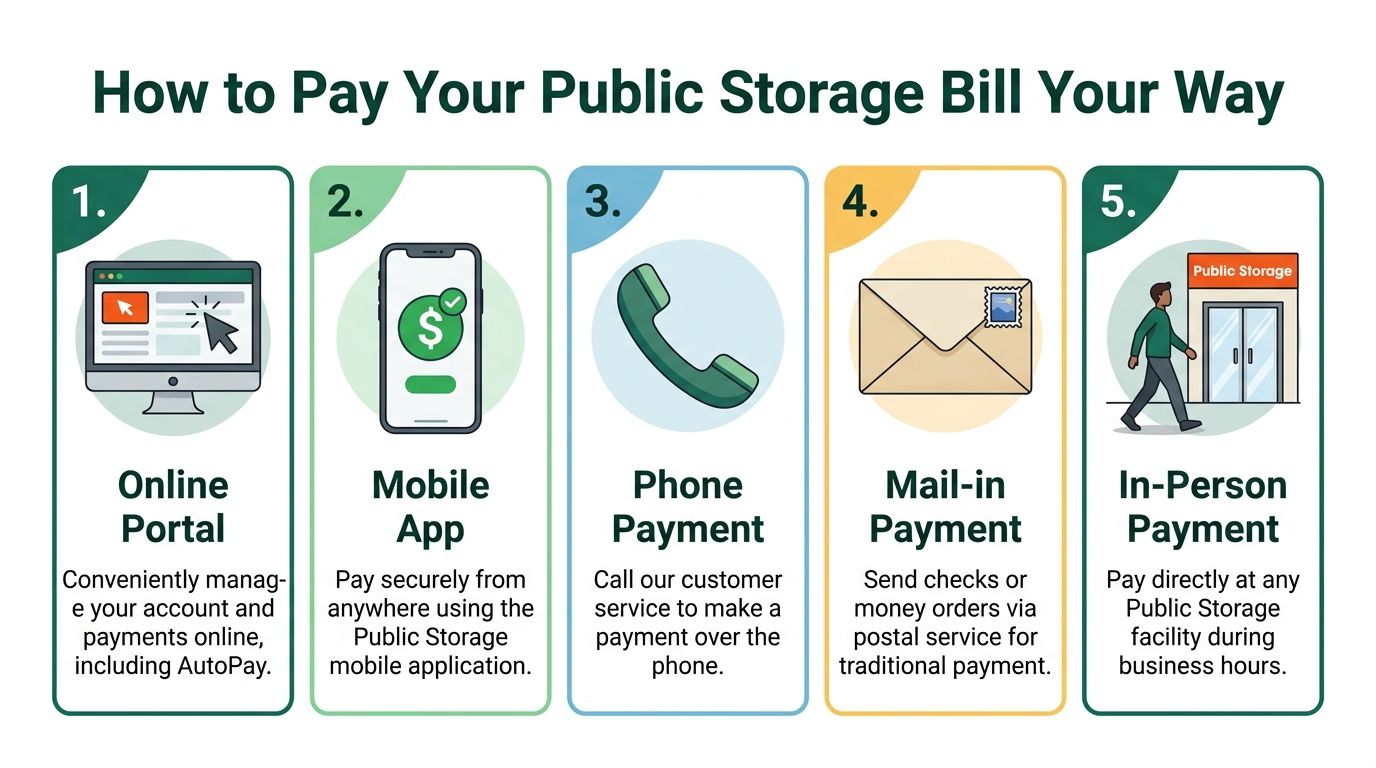
How to Pay Your Public Storage Bill Your Way
A lot of payment trouble starts with a simple mistake. Someone is rushing, picks the wrong method, assumes the charge went through, and only checks the account after a late notice shows up.
Public Storage gives you several ways to pay, but the best option depends on what you care about most: speed, proof of payment, flexibility, or human help. In practice, app and web payments are usually the cleanest methods for routine bills. Phone, mail, and in-person payments still have their place, but they create more room for delay or friction.
Before you pay, have your account number, ZIP code, and preferred payment method ready. Then leave yourself one extra minute to confirm the payment status afterward. That last check prevents a lot of avoidable headaches.
Public Storage payment methods at a glance
| Method | Convenience | Speed | Potential Fees | Best For |
|---|---|---|---|---|
| Online portal | High | Fast to submit | Usually low-friction | Renters who want a full account view on desktop |
| Mobile app | Very high | Fast to submit | Usually low-friction | People who want the quickest monthly routine |
| Phone payment | Medium | Depends on call handling | May include a fee | Renters who need live help or account clarification |
| Mail-in payment | Low | Slowest | No instant confirmation | People paying by check or money order |
| In-person payment | Medium | Often same day | Can vary by location | Renters already stopping by the facility |
The online portal
The portal works well for renters who want visibility. You can review your balance, check payment history, and pay on a larger screen where errors are easier to catch.
This is often the better choice for households managing more than one unit or for anyone who saves receipts and screenshots for records. The trade-off is simple: if you only sign in once a month, you may miss an expired card or an old billing address until the payment fails.
The mobile app
The app is the easiest option for day-to-day use. It is fast, available anywhere, and usually the best method when you want to make a payment and confirm it without waiting on anyone else.
I usually recommend the app first for one reason. People are more likely to check their account when it is already on their phone. That small habit matters. It helps you catch a pending issue before it turns into a late fee.
If you want the lowest-maintenance setup, pay through the app and keep the website as your backup.
Phone payment
Phone payment is useful when something looks off on the account, you cannot access the app, or you want a staff member to confirm what they see before you submit anything.
It is still a backup method, not the one I would build a monthly routine around. Calls take longer, details can be misheard, and any payment process that depends on hold time is harder to trust when your due date is close.
In-person payment
Paying at the facility gives you direct confirmation, which can be helpful if you are already on site and want the issue handled face to face.
That said, convenience is not the same as reliability. Office hours, staffing, and local process differences can slow things down. For a recurring bill, digital payment is usually easier to repeat without mistakes.
Mail-in payment
Mail works for renters who insist on paper checks or money orders, but it is the highest-risk option if your timing is tight. You lose instant confirmation, and you have less control once the payment is in transit.
Use mail only if you are sending it early enough to absorb delays and still have time to react if something goes wrong.
If you are still comparing unit types and providers, this guide to self-storage options gives useful context beyond one company’s billing system. If price is the bigger question, review this comparison of storage unit prices across storage types and providers before you lock yourself into another monthly payment.
Mastering AutoPay for Stress-Free Payments

If you plan to keep your unit for more than a short stretch, AutoPay is the right move. Manual payments are fine until life gets noisy. Then one missed alert becomes a failed month.
Why AutoPay usually wins
AutoPay reduces two common problems: forgetting the due date and entering payment details repeatedly. It also gives you a repeatable process instead of a monthly decision.
The smart version of AutoPay is not “set it and never look again.” It is “set it, then audit it before it breaks.”
How to set it up cleanly
Use the app or website, open Payments, select Turn On AutoPay, choose your method, and confirm enrollment. Then verify that the method saved correctly and check the first cycle afterward in payment history.
A few practical rules matter more than the setup itself:
- Use a payment method you can keep active. If you rotate cards often for fraud protection or rewards, ACH may be less disruptive.
- Update expiring cards early. Do not wait for the month the card expires.
- Do not remove the old method before the new one is fully saved. That is a common way to create a gap.
- Check after move-in proration. Early billing can look odd if your move-in date fell mid-month.
ACH or card
ACH is often steadier for recurring payments because checking account details change less often than cards. Cards are better if you want stronger visibility through your card issuer or prefer to separate bills from your bank account.
Neither is universally better. Reliability depends on your habits. If your card expires often or gets replaced after fraud alerts, ACH is usually easier. If you watch your card activity more closely than your bank account, card may be safer for you.
A quick visual walkthrough can help if you prefer to see the process:
Tip: The best AutoPay setup is the one tied to the account you monitor most often.
If you want a backup contact path for edge cases or account questions, keep the official Endless Storage contact page bookmarked separately for your broader storage planning. For Public Storage itself, use its own account and facility channels for payment-specific actions.
Avoiding Sneaky Fees and Unexpected Charges
The bill usually does not jump all at once. It creeps up through small add-ons, a manual payment fee, a missed due date, or a charge that looks minor until it shows up month after month.
The easiest way to keep Public Storage pay cheap is to separate base rent from payment friction. Rent is one number. What you pay to get that rent posted is another. Renters who only watch the advertised unit price miss the true monthly cost.
One place fees show up is around reservation and payment handling. Public Storage’s reservation payment details spell out some of the payment rules, but the practical lesson is simpler: the web account and app are usually the lowest-hassle way to pay, and live-agent or one-off fixes can cost more in both time and money.
Charges that catch renters off guard
Late fees get the attention, but they are not the only problem.
Phone payments can add cost if you use them as a habit instead of a backup. A failed payment can also turn into a chain reaction if you do not notice it quickly. Then there is the less obvious issue: a small billing difference between what you expected and what posted, especially after promotions end, insurance stays on the account, or the monthly rate changes.
That last one matters more than people expect. If you want a better baseline for comparing your total monthly cost, this guide to self-storage rates helps put payment-related charges in context.
What prevents extra charges
Use a simple check before and after every payment:
- Pay through the app or website first. It is usually the cleanest path and gives you a record immediately.
- Save phone payments for edge cases. They are useful when you are locked out or fixing a problem, not for routine billing.
- Review the full receipt, not just the rent line. Look for fees, insurance, and any rate change.
- Check right after promos or move-in specials end. That is a common point where the amount changes and catches people off guard.
- Question any surprise total the same day. It is easier to fix a fresh billing issue than one that sat for two cycles.
I also recommend keeping your own payment trail. Screenshot the confirmation page or save the emailed receipt every time. If a charge is ever disputed, a timestamped confirmation is faster than trying to reconstruct what happened from memory.
What to Do When Your Payment Fails
A failed payment is frustrating, but it is usually fixable without a long support chain. The fastest route is to troubleshoot in the app before calling anyone.
Analysis of over 1 million transactions shows 55% of payment failures are due to insufficient funds and 20% from mismatched ZIP codes, with 92% of issues being resolvable through self-service in the app (AutoPay troubleshooting help).
Run this check in order
- Open payment history first. Confirm whether the payment is failed, pending, or posted. Do not assume.
- Check the billing ZIP code. Small mismatch, big problem.
- Verify available funds if you are using ACH.
- Look at card expiration and replacement status. Many failures come from a card you forgot was replaced.
- Re-add the payment method instead of only editing it, if the app gives you trouble.
When to escalate
If the payment left your bank but has not credited after a reasonable wait, gather proof first. A bank statement or transaction ID is more useful than a verbal explanation.
Bring that to the facility or use the official account channel. The goal is not just to say “I paid.” The goal is to show exactly when and how the payment moved.
Tip: Start with self-service, then move to bank verification, then escalate with documentation. That order solves most issues fastest.
If your billing problem hits at the same time you are ending your rental, this guide to the Public Storage move-out policy can help you avoid a second headache.
Quick Answers to Your Payment Questions
Can I pay online or in the app without visiting the facility
Yes. That is the easiest path for most renters. It also gives you immediate access to payment history, which matters if you need to confirm status later.
Is AutoPay enough on its own
No. AutoPay is your main defense, not your whole system. You still need to check the saved method occasionally, especially after a bank change, a replaced card, or a move that changed your billing ZIP.
Can I see whether a payment went through
Yes. Check Payment History in your account. That is the first place to look before contacting support or assuming the charge vanished.
Why does Public Storage seem strict about payment timing
Because it runs with large-scale financial controls. As part of a massive REIT with a 257:1 CEO-to-median-employee pay ratio and $4.3 billion in 2024 net income, Public Storage operates on strict financial controls, making timely payments critical to avoid automated lien processes (company pay and financial details).
That does not mean every late payment becomes a crisis. It means the system is built to follow policy, not your intentions.
What is the safest monthly routine
Use AutoPay, review the account before the due date, keep a backup payment method ready, and save your confirmations. That is the version of public storage pay that creates the fewest surprises.
Should I pay by card or bank account
Choose the method you monitor most closely and update most reliably. The best payment method is not the one that sounds best on paper. It is the one least likely to fail in your real life.
If you are tired of facility visits, payment friction, and keeping track of one more monthly unit bill, Endless Storage offers a simpler alternative with storage by the box, online account management, and transparent pricing that fits people moving, decluttering, or living in small apartments.
Frequently Asked Questions
Unveiling the Secrets to Effortless Storage
Endless Storage is available nationwide. You pick a plan, tell us where to pickup, and we'll send a UPS van to collect, whichever state you're in.
Your shipping label will be sent to your email within a few minutes, if not instantaneously. It can also be accessed through your customer profile.
Your box will be shipped to one of our climate controlled self storage facilities in our closest self storage facility. Our manager will accept your package, notify you that your box has been received, and securely stored. Only our managers will have access to Endless Storage boxes.
Email us at admin@endless-storage.com click to live chat with us, or send us a message below.
Never! We're committed to transparent pricing with no surprises. You'll lock in your rate with no hidden fees and no long-term contracts.
Fast access guaranteed! Your boxes will arrive at your doorstep within 48 hours of requesting them back. Need to check on delivery? We provide tracking information for complete peace of mind.
Totally flexible! Store month-to-month with no long-term commitment and cancel anytime.
Everything's online! Use your account dashboard to:
• Set up automatic monthly payments
• Request box returns
• Update your address
• Order additional boxes
• Track shipments
Your boxes are insured up to $100 each. Our customer service team will help you file any necessary claims and resolve issues quickly.
Don't worry – we'll email you right away if there's a payment issue. Your items stay safe, though you may have temporary service interruption or late fees until payment is resolved.
When you request our free storage kits, you'll have 30 days to send in your boxes to activate your 3 months of free storage. Think of it like starting a gym membership – your activation window begins when you receive your kits, and your full free trial begins once you send in your first box. During your free months, you'll experience our complete storage service at no cost.
Your 30-day activation window begins when you receive your storage kits. We'll send you an email confirmation when your kits are delivered, marking the start of your activation period.
If you haven't sent any boxes for storage within your 30-day activation window, your free trial will expire and we'll begin charging the regular monthly rate of $9.99 per box. This helps ensure our storage kits go to customers who are ready to use our service.
A box costs $9.99 per month to store (plus sales tax). This price includes free shipping for standard boxes under 50 lbs. and smaller than 16"x16"x16"
Log into your Endless Storage account, locate the box you would like returned, and simply click Return My Box.
Yes, each box stored with us is insured for up to $100 throughout transit as well as the duration of storage within our facilities.
Your box will be at your doorstep within 48 hours of you requesting it back.
Store 10+ boxes? We'll pick them up for free! After your purchase, we'll contact you to schedule a convenient pickup time and arrange UPS collection.
We trust UPS with all shipments, and every box includes $100 insurance coverage. You'll receive tracking information to monitor your items' journey.
Yes! Visit any of our locations by appointment. Just bring a photo ID matching your customer profile.
For everyone's safety, we can't store hazardous materials, firearms, or perishables. All items must fit within our standard boxes.
It's easy! Order your storage kit online, and we'll ship it to you within 1-2 business days. Your shipping labels will be emailed instantly and available in your account.
We're here to help! Email us at admin@endless-storage.com, use our live chat, or send us a message through your account.
To cancel your storage service with Endless Storage, please email your cancellation request to admin@endless-storage.com. Our team will process your request within 2 business days and confirm your cancellation via email.
We understand packing takes time. However, to maintain your free trial benefits, you'll need to send at least one box within the 30-day activation window. If you need more time, you can always start with one box to activate your trial and send the rest later. You can always reach out to admin@endless-storage.com if you have any issues or concerns.
When you request our free storage kits, you're starting a 30-day window to begin using our storage service.
Important: To activate your free trial, send at least one box for storage within 30 days. If no boxes are sent within this 30-day window, a one-time $50 fee applies to cover materials and shipping costs. This fee is clearly disclosed before you sign up.
Think of it like reserving a hotel room – we're setting aside space and sending specialized packing materials for your use. The fee only applies if you request materials but don't begin storage, similar to a hotel's no-show charge.